
Stop searching. Start fixing.
FuelTech AI Pro gives every technician instant access to manufacturer-level expertise — alarm codes, wiring diagrams, startup procedures, compliance protocols — answered in plain English, right from the job site. No hold queues. No guesswork.
Every response explains the reasoning behind the answer — so you’re not just getting a fix, you understand it well enough to handle it yourself next time.
Mag Plus probe wires to the USM (Universal Sensor Module) inside the TLS-450PLUS — one channel per probe.
WHITE → SIG+ (+) at both the USM terminal and the probe head junction box.
BLACK → SIG– (–) at both ends.
DRAIN wire → SHLD terminal at the console only — leave floating at the probe end to avoid ground loops.
⚠ Reversed polarity = PROBE COMM FAULT on startup.
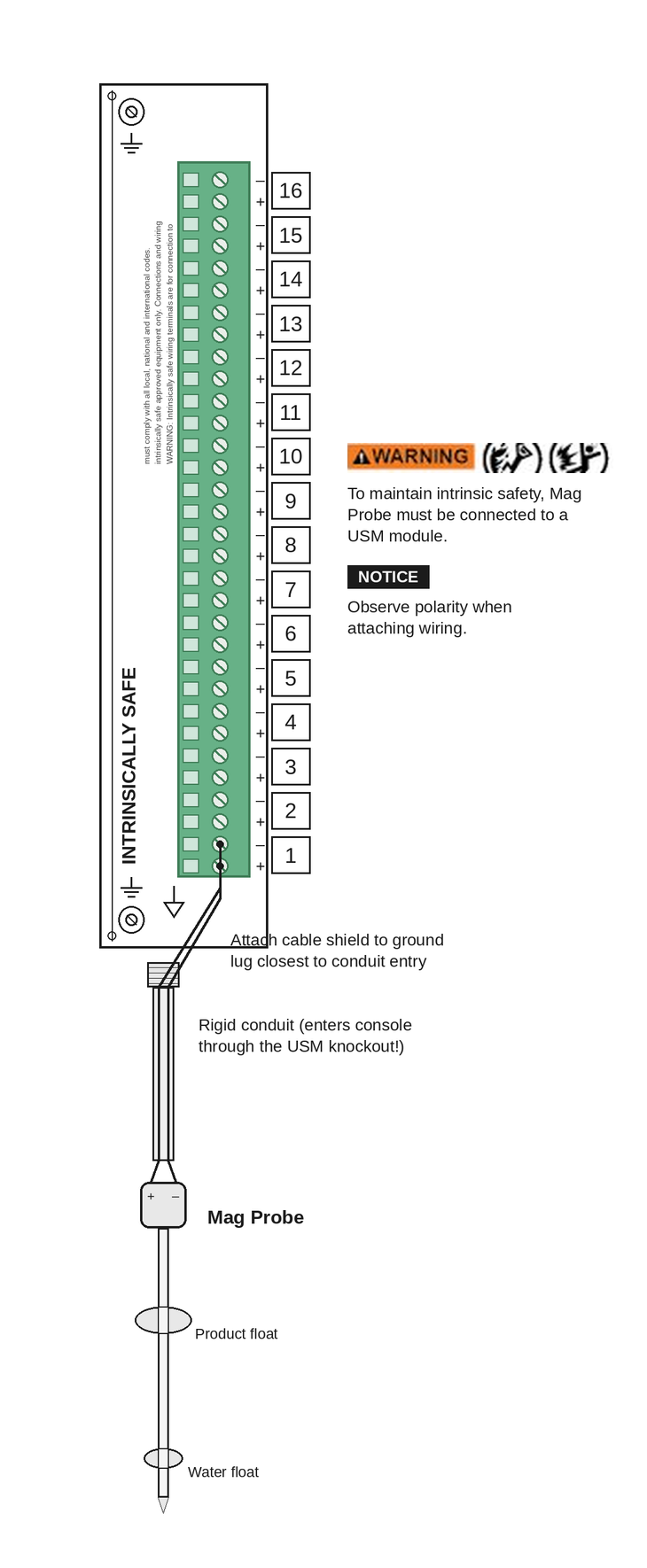
📋 Note for programming: Record the bay number (e.g. Bay 1) and slot/channel position (e.g. Ch 3) where you terminated this probe. You'll need both to correctly assign the tank in the Device Setup menu — wrong position = probe reads the wrong tank or throws a fault.
Use 2-conductor shielded cable (Belden 9740 or equiv) · max 1,000 ft
Source: TLS-450PLUS Field Installation Manual 577013-880, Fig. 3-12
Built for what you actually need to know in the field.
FuelTech AI Pro uses Anthropic Claude and OpenAI to reason through your question against a curated knowledge base built from official Gilbarco, Veeder-Root, Wayne, Red Jacket, and Franklin Fueling documentation — so you get a correct, professional answer grounded in the actual source material, not a keyword match from a search engine.
Alarm & Error Code Diagnosis
Describe an alarm or error condition and the AI interprets it in context — explaining the cause and walking you through the correct resolution the way an experienced tech would.
Diagrams & Schematics On Demand
Ask about any diagram — wiring, installation, component layout, flow, or schematic — and the AI identifies the right figure from the manufacturer documentation and displays it directly alongside the explanation.
Step-by-Step Troubleshooting
Walk through a problem in conversation. The AI asks the right follow-up questions, narrows down the root cause, and gives you a structured path to resolution — without leaving the job site.
Startup & Programming Guidance
Get step-by-step ATG startup procedures, probe configuration, tank setup, and programming sequences for Veeder-Root, Gilbarco, Red Jacket, and Franklin Fueling equipment — pulled from the correct manual for your model.
Expert Answers with Source Citations
The AI reasons through your question using deep manufacturer knowledge — then cites the exact manual and page it drew from, so you can verify and trust every answer.
Cross-Brand ATG & Dispenser Knowledge
Trained across Veeder-Root TLS consoles, Gilbarco dispensers, Wayne/Tokheim/Dover dispensers, Red Jacket and FE Petro submersible systems, and Franklin Fueling equipment — the AI reasons across equipment families, not just one brand at a time.
Field Testing & Compliance Protocols
Get step-by-step guidance on line leak detection testing, precision line testing, tank tightness tests, and field tester operation — including test frequency requirements, pass/fail criteria, and manufacturer-specified compliance procedures.
ATG Dashboard & Control Center
Connect to any TLS-350 or TLS-450PLUS via RS-232 or Ethernet — auto-detected. Browse a full searchable I-code library, send live commands, pull alarm history and setup reports in one click, then push the raw output straight to Atlas AI for an instant plain-English diagnosis with exact fix steps. Read and program — not just read.
Connect. Command. Program. Diagnose.
All from one screen.
Most field tools let you read ATG data. Console Connect lets you control it. Plug in over RS-232 serial or Ethernet — the app auto-detects your connection type and baud rate. You get a live interactive terminal, a fully searchable database of every Veeder-Root I-code command (categorized, described, ready to send), the ability to issue SET commands to program or fix the console on the spot, and a single button that feeds the raw ATG output straight to Atlas AI for an instant plain-English diagnosis with exact repair steps.
Windows 10 / 11 · Included free with Pro or Annual subscription
Built on real manufacturer documentation — always current, always accurate.
Every answer FuelTech AI Pro gives is informed by a continuously updated knowledge base built from official Gilbarco, Veeder-Root, Wayne, Red Jacket, Franklin Fueling, and industry documentation — giving the AI the same reference material a certified technician relies on, but accessible in seconds from any job site.
- ✓ TLS-450PLUS
- ✓ TLS-450i / 450iS
- ✓ TLS-350 / 350R
- ✓ TLS-300
- ✓ Mag Plus Probes
- ✓ Leak Detection Sensors
- ✓ Encore 700 / 700S
- ✓ Eclipse Dispenser
- ✓ CRIND
- ✓ FlexPay IV
- ✓ Passport POS
- ✓ Tech Bulletins
- ✓ Wayne / Tokheim / Dover Dispensers
- ✓ Red Jacket Submersible Pumps
- ✓ FE Petro Products
- ✓ Franklin Fueling Systems
- ✓ Industry Service Manuals
Built for field techs, service companies and ATG specialists.
Whether you're on a startup, running a service call, or training a new hire, FuelTech AI Pro acts as a senior technician on every job — one who knows the equipment, understands the procedures, and can walk you through the answer clearly on the spot.
What technicians are saying.
Real feedback from fuel system professionals using FuelTech AI Pro on the job.
Leave a review
Simple, transparent pricing.
Full access for every technician. Everything included.
🔒 Beta phase pricing — these rates are locked in for early adopters and will increase when we exit beta.
FuelTech AI Pro
Per user — billed monthly, cancel any time
- ✓ Unlimited questions from any device
- ✓ Multi-brand documentation library (Gilbarco, Veeder-Root, Wayne, Red Jacket & more)
- ✓ Error code lookups & alarm diagnosis
- ✓ Diagrams, schematics & installation figures
- ✓ Step-by-step troubleshooting in conversation
- ✓ ATG startup, programming & configuration guidance
- ✓ Field testing procedures & compliance protocols
- ✓ ATG Direct Connect — pull alarm history & setup reports via RS-232 or Ethernet
- ✓ Dispenser, CRIND & EMV support
- ✓ Source citations on every answer
- ✓ Works on phone, tablet & desktop (PWA)
 Subscribe — $14.99/month
After payment, enter your email on the next screen to create your account instantly.
FuelTech AI Pro
Per user — full access for an entire year
- ✓ Unlimited questions from any device
- ✓ Multi-brand documentation library (Gilbarco, Veeder-Root, Wayne, Red Jacket & more)
- ✓ Error code lookups & alarm diagnosis
- ✓ Diagrams, schematics & installation figures
- ✓ Step-by-step troubleshooting in conversation
- ✓ ATG startup, programming & configuration guidance
- ✓ Field testing procedures & compliance protocols
- ✓ ATG Direct Connect — pull alarm history & setup reports via RS-232 or Ethernet
- ✓ Dispenser, CRIND & EMV support
- ✓ Source citations on every answer
- ✓ Works on phone, tablet & desktop (PWA)
Pay with PayPal — $99/yearAfter payment, enter your email on the next screen to create your account instantly. Questions? Email info@fueltechaipro.com
FuelTech AI Enterprise
Per organization — contact us for pricing
- ⬡ Everything in Pro, for your whole team
- ⬡ Multi-user accounts with admin dashboard
- ⬡ Upload your own proprietary documentation
- ⬡ Usage analytics & activity reporting
- ⬡ Priority support & dedicated onboarding
- ⬡ API access for integrations
- ⬡ Custom branding options
- ⬡ Volume licensing for service fleets
Interested in enterprise access? Email info@fueltechaipro.com to get on the early access list.
Disclaimer & Limitations of Use
FuelTech AI Pro is an AI-assisted reference tool intended for use by qualified fueling equipment technicians. It is not a substitute for professional training, manufacturer-approved procedures, or official certification. AI-generated responses may occasionally be incomplete, outdated, or inaccurate — always verify critical procedures against the applicable Gilbarco, Veeder-Root, or manufacturer service manual before performing any work.
For safety-critical decisions, regulatory compliance questions, or operations involving hazardous materials, defer to manufacturer guidance, local codes, and certified professionals. FuelTech AI Pro and Gen X Data Acquisitions LLC assume no liability for damages, injuries, or losses arising from reliance on information provided by this service.
FuelTech AI Pro is not affiliated with, endorsed by, or sponsored by Gilbarco Veeder-Root, Dover Fueling Solutions, or their parent companies. All manufacturer names and trademarks are the property of their respective owners and are referenced solely to identify the equipment this service supports.